Ether Radio
Stream 50,000+ live radio stations worldwide from your Mac's menu bar. Auto-tuned to your country, with live bitrate and one-click favourites.
One popover, nothing else
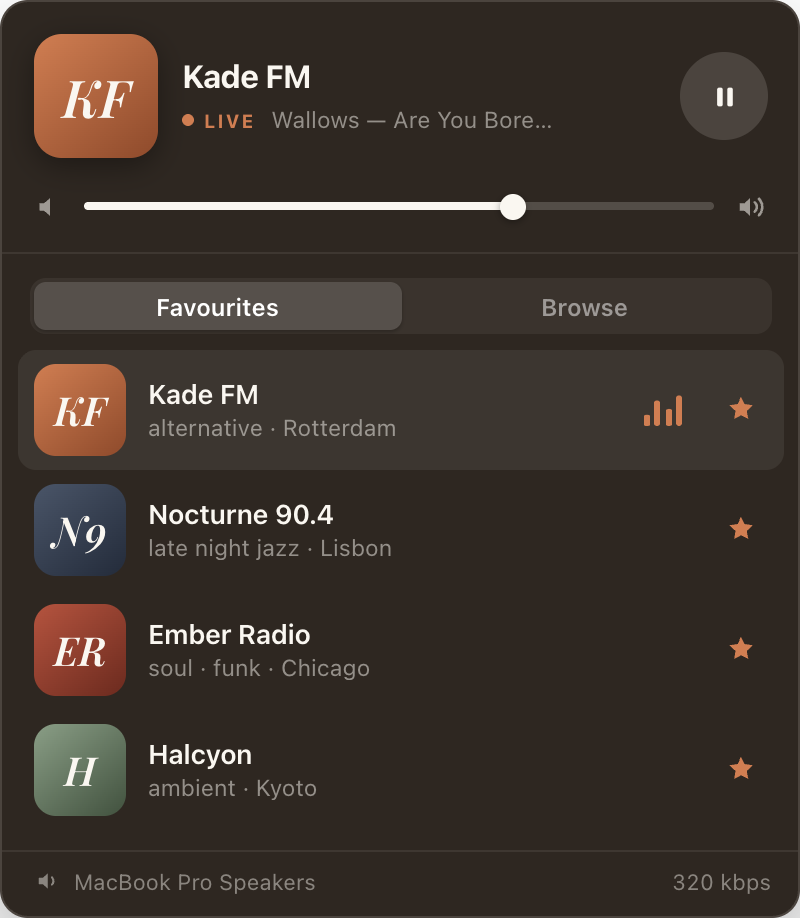
Ether Radio has no window and no Dock icon. This is all of it — it drops down from the menu bar and gets out of the way again.
A radio dial for the whole world, one click away
Click the ripple icon and a glassy popover drops down with what's playing, a volume slider, and instant access to your favourite stations. No window to manage, no Dock icon, no clutter.
Tuned to where you are
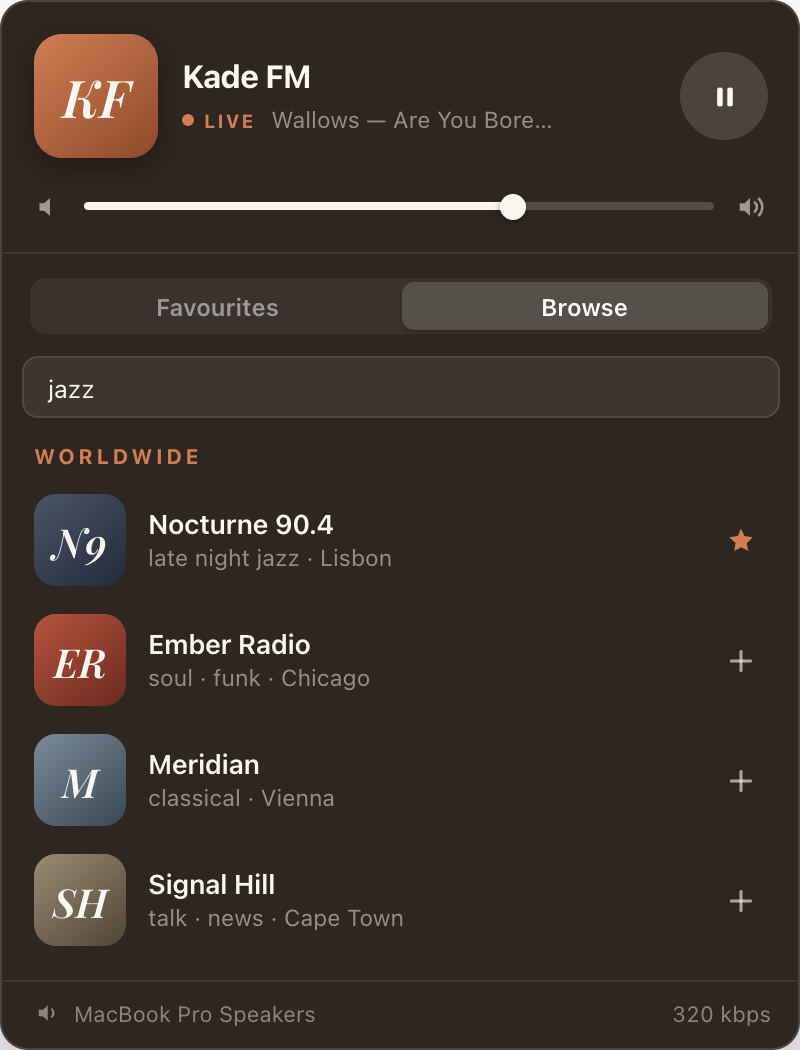
Browse opens on a shelf of the most-listened-to stations in your country, detected automatically from your Mac's region setting — and changeable any time.
50,000+ stations worldwide
Search by name, city or genre. Ether Radio pulls live results from the open radio-browser.info directory, best-voted first, with broken streams already filtered out.
Now playing, properly
Station logo, an animated equalizer, and the live track title pulled straight from the stream itself — plus Control Center and media-key support.
One-click favourites
Star any station and it's remembered every time you open the app — stored on your own Mac, so your favourites still work offline.
Live bitrate
See the actual kbps of the stream you're listening to, measured from the connection — not a marketing number from a listing.
Any output, live
Switch between speakers, headphones or AirPlay mid-stream without missing a beat. Right-click the menu bar icon to quit — that's it.
Nothing bundled, nothing stale
Ether Radio ships with no bundled station list. Instead it talks directly to the community-run radio-browser.info directory, so what you hear is whatever stations are actually broadcasting right now — no stale list, no missing stations, and logos come straight from each station's own submission to the directory.
That also means the app is only as complete as the directory is. If a station you love isn't there, anyone can add it to radio-browser.info and it will show up in Ether Radio's search shortly afterwards.
Ether Radio is an independent app, not affiliated with any broadcaster or with radio-browser.info.
Help & common questions
Most issues come down to a station's own server rather than the app. Here's how to tell the difference, and what to do about it.
Playback
A station won't play, or cuts out after a moment
Ether Radio connects your Mac directly to the broadcaster's own streaming server, so when a station fails it is almost always that server, not the app. Stations go offline for maintenance, hit their listener limit, move their stream address, or restrict access to certain countries.
Try another station first. If everything fails, it's a connection issue on your side; if only that one fails, the station is down. Stations that stay broken are eventually filtered out of the directory.
I can see it playing but there's no sound
Check, in this order:
- The volume slider inside the Ether Radio popover — it is separate from your system volume.
- Your Mac's system volume, and that it isn't muted.
- The output device selected in the popover. If headphones or an AirPlay speaker were chosen and then disconnected, the audio may still be routed there.
Playback stalls when my Mac sleeps or changes network
A live stream cannot be paused and resumed the way a file can — when the connection drops, the broadcast simply carries on without you. After waking your Mac or switching between Wi-Fi and ethernet, select the station again to reconnect.
The track title is missing or wrong
Track titles are sent by the station inside the stream itself. Not every broadcaster sends them, and some send the show name, an advert, or a station slogan instead. Ether Radio displays exactly what arrives — when nothing arrives, it shows the station name on its own.
The bitrate shown doesn't match what the station advertises
That's deliberate. The figure in Ether Radio is measured from the stream you are actually receiving, so it reflects what the server is really sending — which is sometimes lower than the number in the station's own listing.
Stations & favourites
How do I change my country?
Ether Radio reads your Mac's region setting on first launch to decide which country's popular stations to show. You can change it from the country selector in the Browse view at any time, and your choice is remembered. The app never uses location services and never looks your location up from your IP address.
I can't find a station I know exists
Search covers station name, city and genre, so try each in turn — many stations are listed under a call sign or a frequency rather than the name used on air. Results come back best-voted first.
If it genuinely isn't in the directory, it hasn't been submitted yet. The directory is community-run and open to anyone: adding it at radio-browser.info will make it searchable in Ether Radio.
A station's logo is missing or looks wrong
Logos are not supplied by Apzin. Each one is hosted by whoever listed the station in the directory, and loaded from that server when the station is displayed. When there is no logo, or the link has rotted, Ether Radio draws a placeholder locally instead. Corrections go to the directory, not to us.
Where are my favourites stored, and will I lose them?
On your Mac, in the app's own sandboxed storage — not on any server, because Apzin runs none for this app. Alongside each favourite the app keeps a copy of the station's details so your favourites still work when you're offline.
They are not synced between Macs. Deleting the app removes them.
The app itself
The menu bar icon has disappeared
Ether Radio has no Dock icon and no window, so the menu bar icon is the whole app. If it isn't visible, the menu bar is usually just full — macOS hides the overflow, most often on laptops with a notch. Quit a few other menu bar apps, or hold ⌘ Command and drag icons along the menu bar to reorder them and bring Ether Radio back into view.
How do I quit the app?
Right-click the ripple icon in the menu bar and choose Quit. There is no Dock icon and no menu bar app menu to quit from.
Does Ether Radio collect any data about me?
No. There are no accounts, no analytics, no advertising and no tracking of any kind, and Apzin receives no data from the app at all. Your favourites and settings stay on your device.
The app does reach the internet to do its job, which means the station directory and the broadcaster you listen to can see your IP address, as they would if you opened the stream in a browser. That's set out in full in the privacy policy.
Can I use Ether Radio offline?
Not for listening — every station is a live internet stream. The app does cache your favourites and the last-loaded popular stations for your country, so it isn't empty when there's no connection, but playback needs the network.
Write to us — a person reads it
Ether Radio is made by a small team at Apzin. If something is broken, confusing, or missing, we'd like to hear about it.
hello@apzin.com- Reporting a problem? Tell us the station name, what you saw, and your macOS version — that's usually enough to reproduce it.
- Station missing or mislabelled? That lives in the radio-browser.info directory and is fixed there, by anyone.
- Privacy questions go to the privacy policy first — it covers everything the app touches.